
How do I update my account details on PokerStars?
How do I update my phone number?
Website
- Log in to your account
- Navigate to the phone number section.
- Enter your new number in the 'Phone number' field
- Click 'Apply'.
Open account detail changes window

Mobile
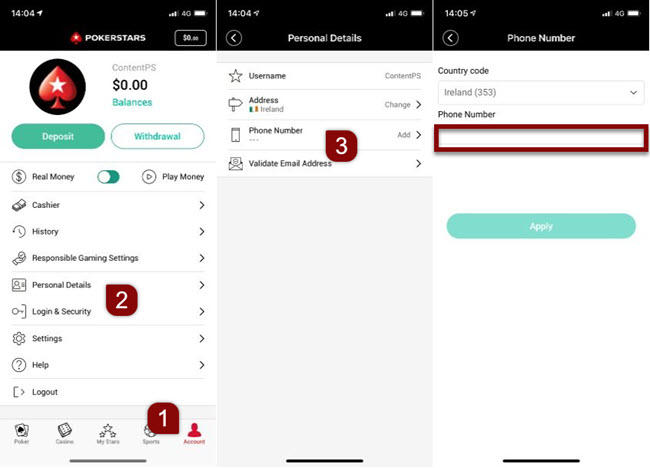
- Log in to your account.
- Go to your 'Personal details' page.
- Click on 'Add' in the 'Phone number' field.
- Make the desired changes.
Open account detail changes window
Steps to update your phone number in the mobile app
Desktop
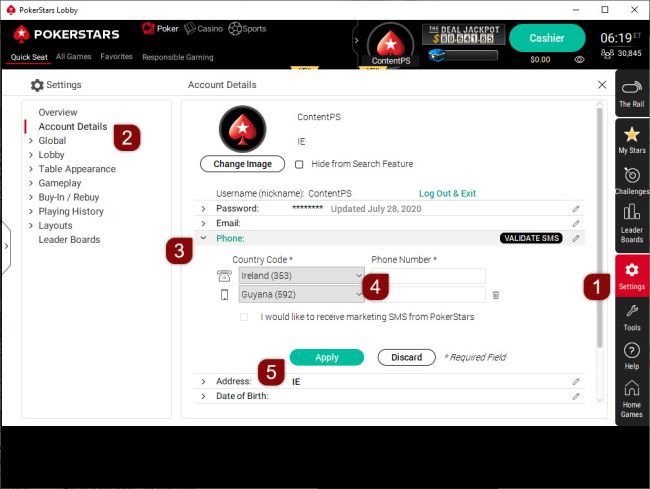
Log in to your account from our software, and follow these steps:
- Go to 'Settings' from the main lobby.
- Select 'Account Details'.
- Choose 'Phone'.
- Enter your phone number (the country code is already filled in).
- Press 'Apply'.
Steps to update your phone number (desktop)
How do I update my email address?
Follow the instructions below to login and update your email. Choose the platform you're using:
Desktop
- Log in to our desktop software.
- Go to 'Settings'.
- Select 'Account Details'.
- Choose 'Email'.
- Enter your new email address.
- Confirm with 'APPLY'.
Steps to update your email address (desktop) in English
Mobile
If you are using your mobile phone, press the button below.
Then log in and follow the instructions.
Open to update email address (mobile)
Steps to update your email address (mobile) in English
Website
If you use our website, press the button below. Then log in and follow the instructions.
Open to update email address (desktop)
How do I confirm my new email address?
A 4-digit verification code is sent to the new email address.
To confirm the change:
- Return to the Email section in 'Account Settings'
- Enter the verification code
What should I do if I don’t receive the verification code?
If you do not receive the email:
- Check your junk or spam folders
- Make sure the email address was entered correctly
The message may have been filtered by your email provider.
How do I enter or update my date of birth?
- Log in to your account.
- Navigate to 'Settings'.
- Select 'Account Details'.
- In the 'Date of Birth' field, enter the correct date.
- Confirm by pressing the 'Apply' button.
If an incorrect date of birth was entered, submit a request to correct it with a copy of a valid government issued ID.
Make the subject line 'Change of date of birth' and a brief reason for the update. Once received, the information will be reviewed and updated.
How do I update the name on my account?
- If registration is incomplete → contact Support
- If completed → submit ID
Accepted documents include:
- a government-issue ID card
- passport
- driver’s license.
If a name changes due to marriage or divorce, the marriage or divorce certificate must be submitted.
The document must clearly display both the birth name and the current legal name.
The update will be processed once the documents have been verified.
How can I update my gender?
- If form is incomplete → contact Support
- If there has been an official change → submit ID
How do I update my home address?
The feature to manually update your mailing address is currently disabled.
If you need to change your address:
- Contact Support and provide your new details.
- The Support team will update your account manually.
Updating your address will trigger the verification process. You must complete identity verification again.
During this period, your account will have limited access.
See: details about the verification process at PokerStars.
What happens if I move abroad?
If your country of residence has changed:
- Create a new account from your location.
- Submit the following documents:
- A valid government-issue photo ID (passport or national ID), showing:
- Full name
- Current address
- Issue date
- Recent proof of address (utility bill or bank statement), showing:
- Full name
- Current address
- Issue date (no older than 3 months)
- A valid government-issue photo ID (passport or national ID), showing:
- Upload the documents via the app, website or software.
If you cannot access your account, get in touch through the 'Contact Us' button.
How do I upload my documents?
In the desktop version, from the main lobby, choose 'Help' and:
- Help → Contact Us
- Security and Verification
- Upload Documents
Then follow the instructions to upload your documents through our Contact Form.
To upload via our website or mobile:
Important information: We can’t accept mobile phone screenshots from .ES players.
How to verify my account?
See: information on the Know Your Customer (KYC) process
What should I do if I keep having issues updating my account?
Contact the PokerStars Support team.
Did you find this article useful?
Related Articles
- Know Your Customer verification process
- Validate your account
- Manage your table image
- Closing your account
- How do I migrate my PokerStars account to PokerStars.DE?
- Verify your payment account (Germany)
- Verify your account details (Germany)
- How do direct bank transfer withdrawals work?
- Cross-Operator Deposit Limits (Germany)
- Take a break from playing